MINIMUM REQUIREMENTS:
¯¯¯¯¯¯¯¯¯¯¯¯¯¯¯¯¯¯¯¯¯
Php 8+ and Apache 2.4 (Strongly suggested migrate to Php 8.5+)
Tar Command available
Exec Php function available
ZipArchive Class available
SQLite available
TARGET SERVER OS:
¯¯¯¯¯¯¯¯¯¯¯¯¯¯¯¯¯
Linux
Unix
MacOS(X)
Windows
USAGE:
¯¯¯¯¯¯
01) first upload ssbackup folders/files in the root of your website!
02) then browse with your web browser and run index.php.
03) follow the instructions that will appear on the screen.
04) when done, configurate your backup options.
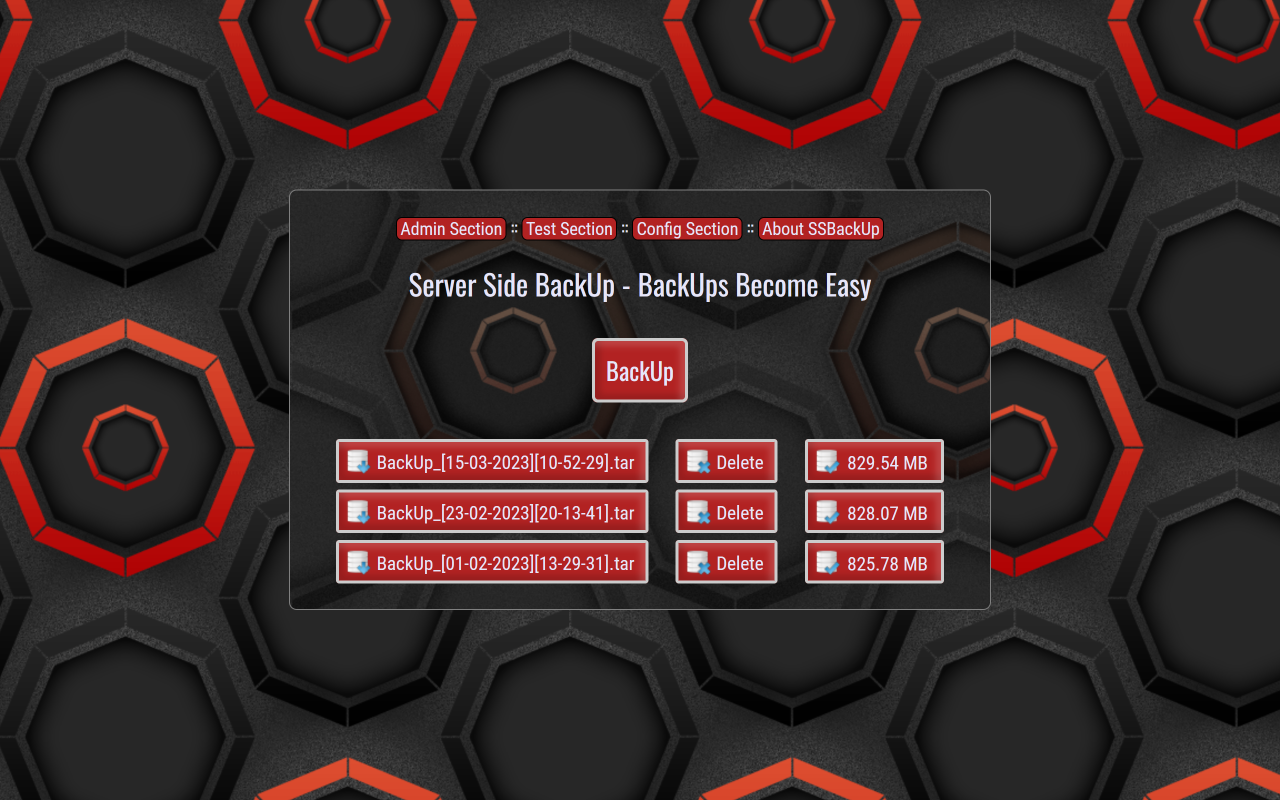
05) now press "BackUp" button and wait until backup is done!
NOTE:
¯¯¯¯¯
With this release, SSBackUp becomes officially universal. It now works also
on Windows through the ZipArchive class, complementing and not replacing the
Tar logic already consolidated on Linux, Unix and MacOS(X). All backups are
now created without compression, with the same sobriety and speed on every
platform, preserving the handling of files and folders without any loss of
functionality. The refactoring has introduced improvements and new features
while ensuring the same level of security across all systems.
Warning: the access credentials created remain tied to the operating system.
For example, those generated on Windows cannot be reused on Linux, Unix or
MacOS(X) and vice versa. To use the application across multiple systems, the
credentials must be recreated natively on each system, since the algorithms
that generate them are different for each environment. Please do not use spe
cial characters to create credentials, as Apache cannot read them.
HISTORY:
¯¯¯¯¯¯¯¯
SSBackUp -> 1.0.00 -> 26/02/2015:
-> Initial Project
SSBackUp -> 1.1.00 -> 01/03/2015:
-> Improved apache-ht.php (rewrite code, used css)
-> Improved index.php (fixed bug js)
-> Improved backup.php (updated infos)
-> Improved backup.css (fixed bug layout)
-> Improved readme.txt (updated infos)
SSBackUp -> 1.2.00 -> 06/03/2015:
-> Improved backup.css (rewrite css)
-> Improved apache-ht.php (fixed annoying notice)
SSBackUp -> 1.3.00 -> 04/04/2015:
-> Improved index.php (added elapsed time code)
-> Improved backup.php (added elapsed time code)
-> Improved apache-ht.php (fixed validating bug)
-> Improved readme.txt (updated this readme)
-> Improved backup.css (updated look)
SSBackUp -> 1.4.00 -> 05/04/2015:
-> Improved index.php (added filesize)
-> Improved backup.php (updated infos)
-> Improved apache-ht.php (updated infos)
-> Improved readme.txt (updated this readme)
-> Improved backup.css (added filesize)
SSBackUp -> 1.5.00 -> 07/04/2015:
-> Improved index.php (added security routines)
-> Improved backup.php (added security code)
-> Improved apache-ht.php (fixed salt in password)
-> Improved readme.txt (updated this readme)
-> Improved backup.css (introduced css tooltips)
-> Created error.php (checks if there are errors)
-> Created test.php (checks functions and commands)
-> Folder "try" (replace "busy.gif" with others)
-> Php Location (compliant to standard browsers)
-> Fixed stupid bug (regarding apache-ht.php)
SSBackUp -> 1.6.00 -> 12/05/2016:
-> Created exclude.php (you can exclude folders)
-> Fixed apache-ht.php (password is hidden now)
-> Edited backup.php (now accepts exclusions)
-> Updated all files (minor changes, this readme)
-> Edited some files (files with header Location)
-> Edited error.php (now more friendly)
-> Solved cosmetic issue due to wrong css rules
SSBackUp -> 1.7.00 -> 18/02/2017:
-> Updated all files (fixed some security bugs)
SSBackUp -> 1.8.00 -> 19/09/2017:
-> Updated all files (created date config panel)
-> Improved password creation under Windows
-> Implemented "Check For Updates" function
-> SQLite Log to view who has access to your files
SSBackUp -> 1.9.00 -> 01/01/2019:
-> Migrated the whole project to HTML5
-> Fixed timestamp issue when renaming files
SSBackUp -> 2.0.00 -> 02/10/2019:
-> Removed "Check Updates" function
-> Replaced check updates with about version
SSBackUp -> 2.1.00 -> 11/12/2019:
-> Added italian, english translations
-> Renamed error.php to welcome.php
-> Added an alertbox for using correctly this app
-> Fixed bug of missing inclusion of .htaccess in the root
SSBackUp -> 2.2.00 -> 14/01/2022:
-> Added limit to backups (fully configurable)
SSBackUp -> 2.3.00 -> 23/03/2023:
-> Improved the graphic aspect
-> Fixed Php 8 compatibility issue
SSBackUp -> 2.4.00 -> 19/11/2025:
-> Refactoring
SSBackUp -> 2.5.00 -> 20/07/2026:
-> New Refactoring
AUTHOR:
¯¯¯¯¯¯¯
Alecos -> Alessandro Marinuzzi (Italy)
WebSite:
https://www.alecos.it
Privacy:
Information about Privacy
STATUS:
¯¯¯¯¯¯¯
SSBackUp (Server Side BackUp) • Copyright © 2015-2026, Alessandro Marinuzzi.
[Alecos]. All Rights Reserved. SSBackUp has been released with Donationware
license.
SSBackUp (Server Side BackUp) is Donationware! This means that if you like
this software you could decide to make me a Donation using PayPal. In this
way you will keep the development of this software alive! Thank you for your
support!
Visit my website for making a Donation!
DISCLAIMER:
¯¯¯¯¯¯¯¯¯¯¯
THIS SOFTWARE IS PROVIDED "AS IS", WITHOUT WARRANTY OF ANY KIND, EITHER
EXPRESSED OR IMPLIED, OR OTHERWISE. BY USING THIS SOFTWARE, YOU ACCEPT THE
ENTIRE RISK. ALESSANDRO MARINUZZI SHALL BE NOT LIABLE FOR ANY DIRECT OR
INDIRECT DAMAGE, INCLUDING DAMAGE FOR ANY DATA OR INFORMATION WHICH MAY BE
LOST.